> For the complete documentation index, see [llms.txt](https://docs.aisera.com/llms.txt). Markdown versions of documentation pages are available by appending `.md` to page URLs; this page is available as [Markdown](https://docs.aisera.com/agent-assist/using-the-agent-assist-window.md).
# Using the Agent Assist Window
There are four key features of the Aisera Agent Assist software that you can track and configure using the [**Agent Assist**](https://aisera.com/products/assist/) analytics Window.
Each of these features is represented as a separate tab on the Agent Assist analytics window.
## **Auto-Resolution:**
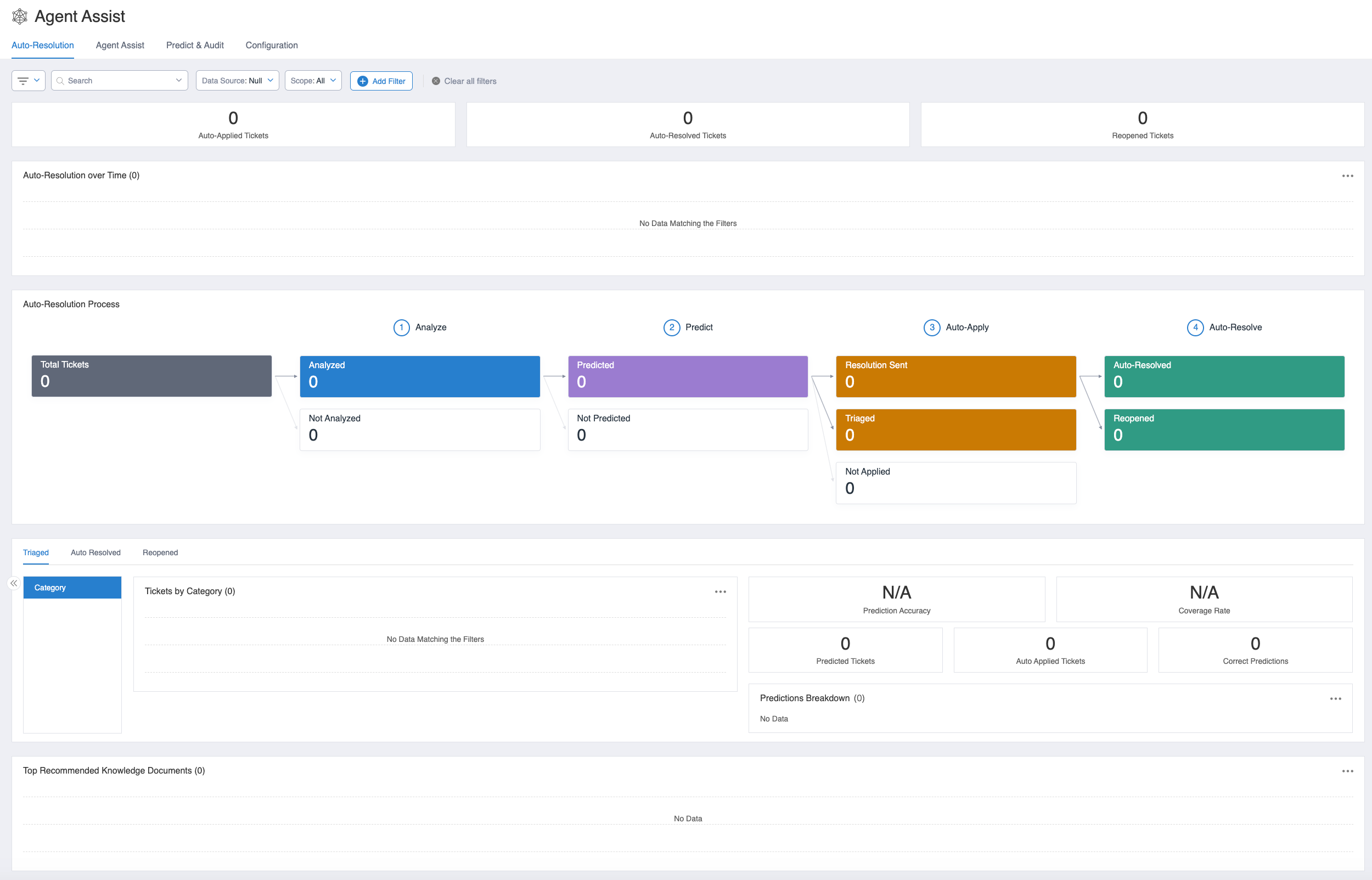
Instead of using **Intents**, **Agent Assist** uses **Auto Resolution** to analyze tickets and utilizes Natural Language Understanding (NLU) software to identify the user’s **Request**.
Auto-Resolution tab of Agent Assist Window
### Letter from Agent Assist
If the Aisera platform can identify a resolution to the case with high confidence, the software will send an email response to the ticket reporter with the answer.
You have the ability to configure what actions are taken when an email response is sent. The Aisera platform can update the ticket status to Resolved and change the Assignee to Aisera.
The Agent Assist software will ask the recipient of the email if the recommended answer resolved their case. If so, the case **Status** will be changed to **Closed**, if not, the case will get re-opened.
## **Ticket Agent Assist:**
The Agent Assist software automates the escalation of cases before they hit timed service-level thresholds. The AI-driven system continuously monitors all open cases against predefined SLA criteria.
When a case is approaching its threshold, the system triggers alerts to notify agents and relevant personnel, such as management or Tier 2 support teams. Customizable escalation rules ensure that appropriate actions are taken, including escalating the case to higher-level support teams, to maintain timely and efficient case resolution.
### **Predict & Audit:**
The Predict & Audit tab allows you to review trends and audit tickets. You can see **Sentiment Predictions** based on the language and content utilized in a ticket.
Agents view the sentiments as pop-ups within the virtual assistant window to warn them about dissatisfied employees who need urgent help. The sentiment will evolve as the ticket evolves so if the ticket reporter becomes increasingly angry throughout the life cycle of the ticket, and the predictions will reflect this.
## **Configuration Tab**
The Aisera platform offers robust Analytics on the field values predicted by the Aisera GenAI Platform compared to the actual value utilized by the bot agent on closed cases. Aisera will learn from the incorrectly predicted values to continually improve accuracy.
In addition, you can start a **Knowledge Predictions Accuracy** Job from the **AI Assist** Window.
#### Agent Applied KPIs for Case Summary, Aisera Answer, Next Best Actions
The **Agent Applied Key Performance Indicators (KPIs)** include the **Case Summary**, **Aisera Answer**, and **Next Best Actions** sections. These are based on **Analyzed Tickets**, which reflects the number of tickets an agent opens in the **System Of Record (SOR)** and where the widget loads.
Additionally, the KPI calculation tracks the number of distinct tickets where a recommendation was applied, rather than the total number of times the **Apply** action was selected.
### Understanding and Improving KPIs
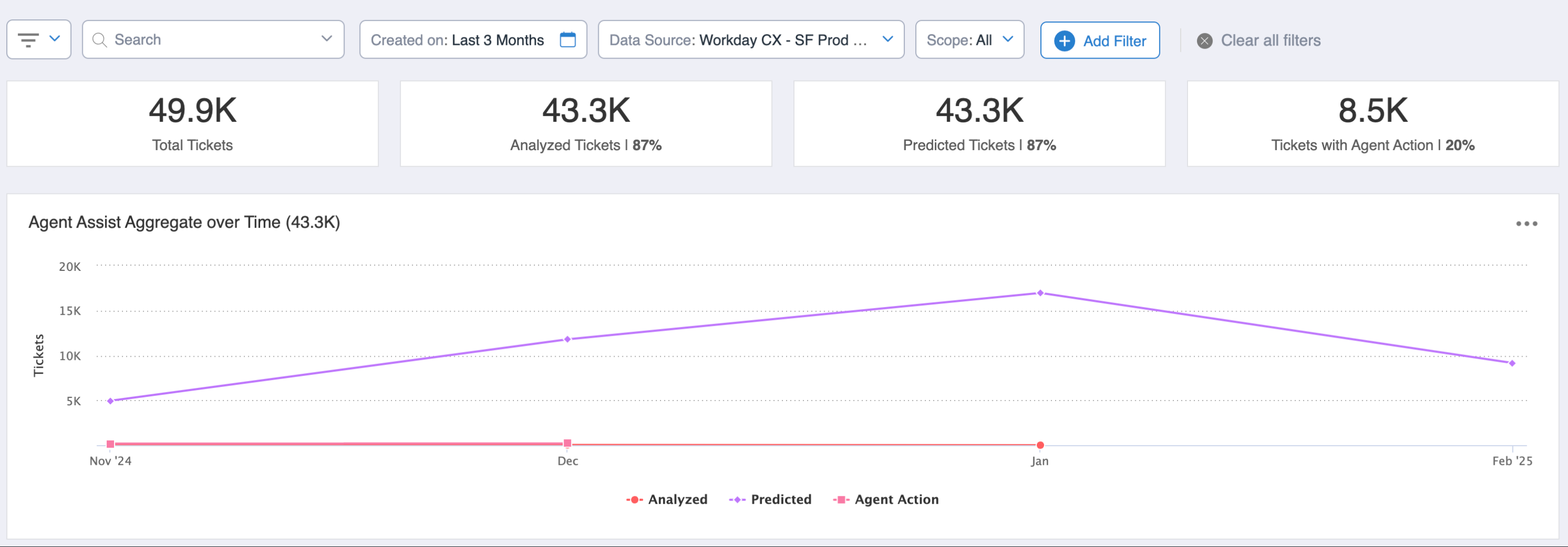
1. **Total Tickets** - Total Number of distinct tickets ingested into Aisera
1. Total Tickets = (Ingestion Tickets ∪ Event Studio based tickets) (U= Union)
2. Ingestion Tickets - Tickets through datasource ingestion job. Jobs could be driven by a query.
3. Event Studio based tickets - Tickets pushed through event trigger/business rule from SOR. It is possible that some of the tickets are filtered. We dont could the tickets if they are filtered out.
2. **Analyzed Tickets**: Number of distinct tickets opened by an Agent in the ticketing system where the Agent Assist widget loaded.
3. **Predicted Tickets**: Number of distinct tickets where Aisera made at least one non-empty prediction for Summary, Answer, Next Best Action or Field Predictions.
4. **Tickets with Agent Actions**: Number of distinct tickets where an agent provided feedback, copied the summary, answer or next best action, or applied a field prediction
5. **Agent Assist Aggregate over Time**: Measures the overall ticket trends of Analyzed tickets, predicted tickets and agent actions, over a specific time period.
Agent Assist Aggregate Over Time
### Tracking Agent Adoption:
1. **Tickets with Agent Feedback:** Total number of tickets where agents provided feedback on the values predicted by Aisera widget. Tickets where feedback was provided on the Case Summary, Aisera Answer, Field Prediction and Next Best Actions.
2. **Agents who applied predictions**: Total number of agents who applied predictions provided by Aisera widget. Agents applied Case Summary, Aisera Answer, Field Prediction and Next Best Actions. \
\
In this context, Applied means:
1. Copy/Post/Email Case Summary
2. Apply/Post/Email Answer
3. Copy/Post/Email Next Best Action
4. Apply Field Prediction
3. **Agents who Provided Feedback:** Total number of agents who provided feedback in the widget. \
\
In this context, Feedback means:
4. Thumbs up/down on Case Summary
5. Thumbs up/down on Answer
6. Thumbs up/down on Next Best Actions
### Feedback Section
#### 1. Aisera Answer
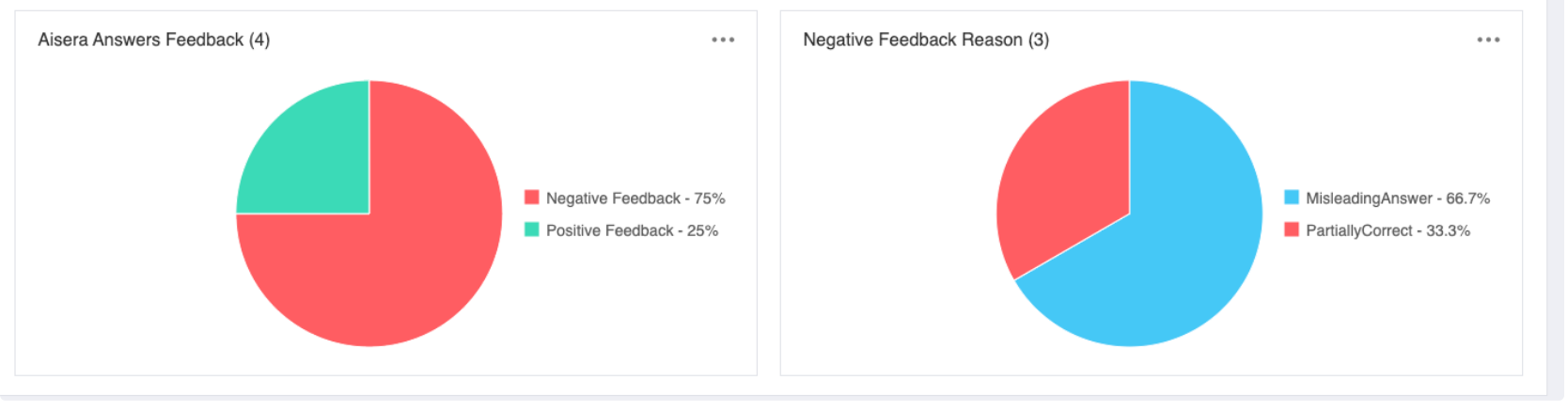
* This section represents the breakdown of positive (Thumbs up) and negative (Thumbs down) feedback. For negative feedback, this section also shows the further breakdown of negative feedback by categorizing negative feedback into different categories.
Feedback Analytics
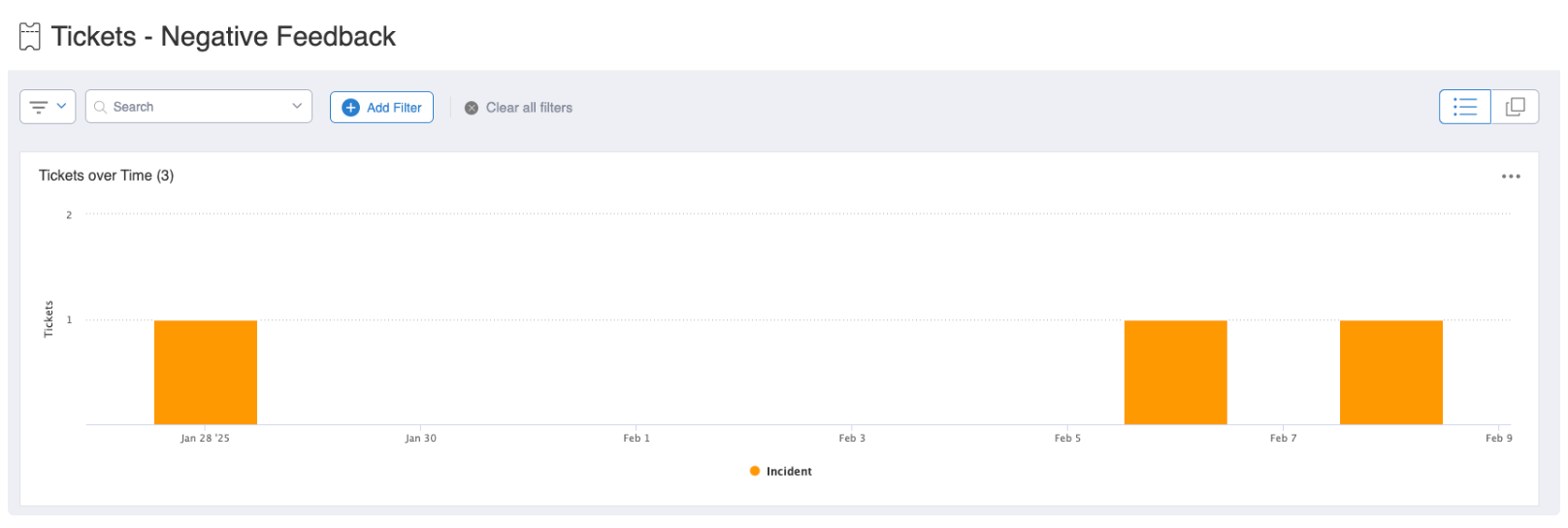
* When you further click on any of these charts, it gives you a trend line for when these feedbacks where received and against which tickets.
Negative Feedback
* **Coverage rate:** The number of tickets with non-empty Aisera Answer predictions / Predicted Tickets.
* **Agent Applied:** The number of distinct tickets where an agent applied or copied Aisera Answer.
* **Agent Clicked**: The number of times an agent clicked into the reference articles provided by Aisera Answer.
### **Feedback Reporter Field in Agent Assist**
The **Feedback Reporter** field in the **Agent Assist** window allows you to identify which agent gave the positive or negative feedback for **Aisera Answer** and **Next Best Actions**.
**Use case:** Multiple human agents might be working on a case. They may give different feedback for the same **Aisera Answer**.
You can see who left the feedback in the **Feedback Reporter** field of the **Agent Assist Recommendations** table.
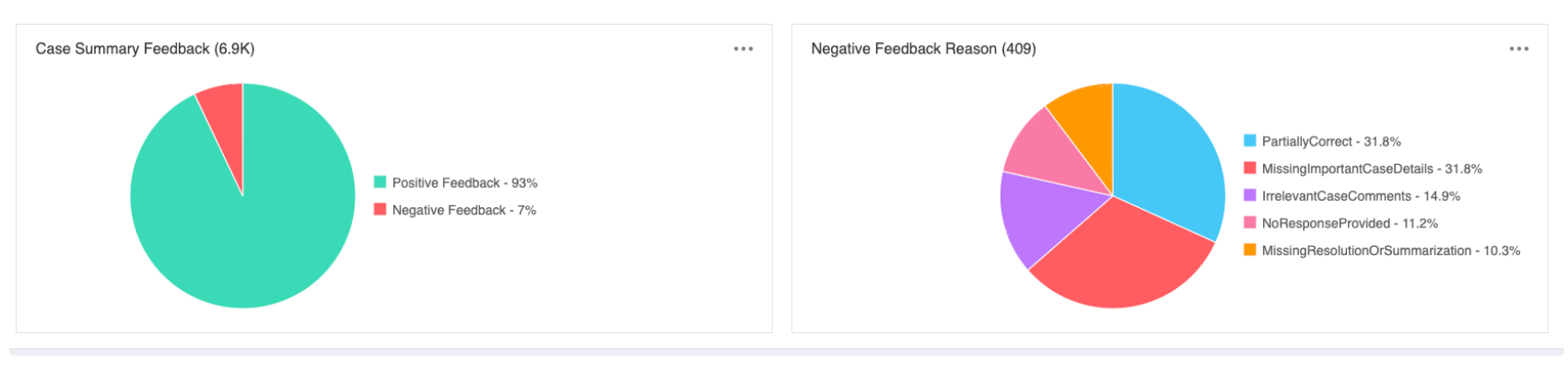
#### 2. Case Summary
* Similar to above, this section also provides breakdown of positive and negative feedback received on case summary.
* Admin can click on individual graphs to better understand which tickets received these feedbacks.
Case Summary Feedback
* **Coverage Rate:** The number of tickets with non-empty Case Summary predictions / Predicted Tickets
* **Agent Applied:** The number of distinct tickets where an agent applied or copied Case Summary.
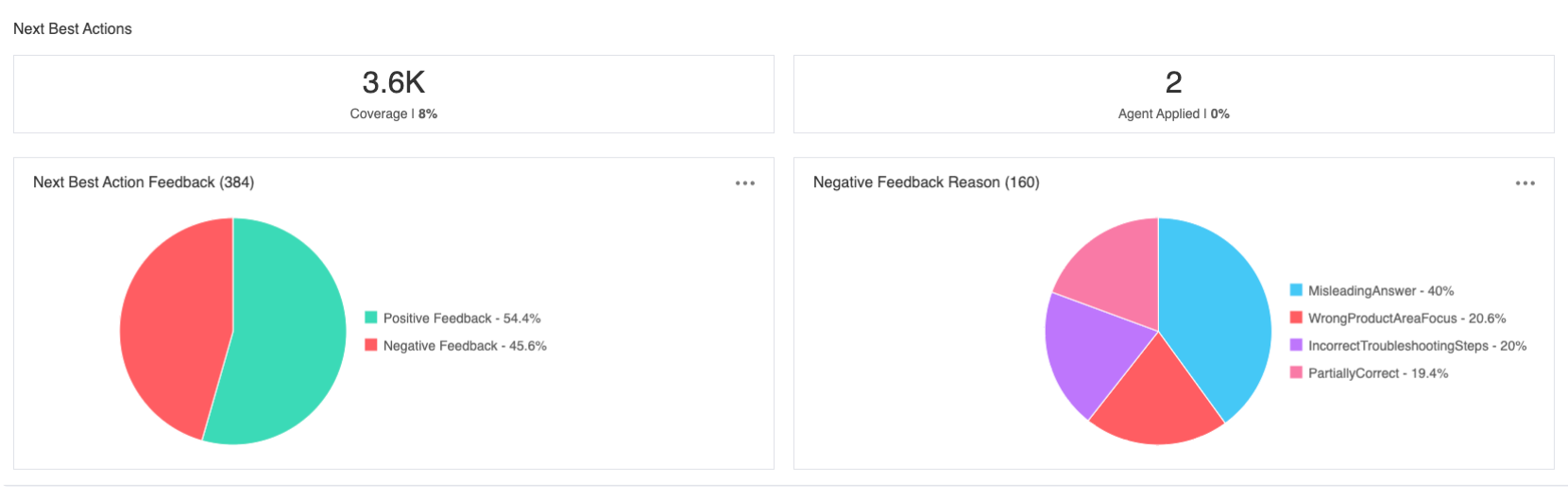
#### 3. Next Best Actions
* This section provides the breakdown of positive and negative feedback on Next Best Actions.
* Admin can click on individual graphs to better understand which tickets received these feedbacks.
Next Best Actions
* **Coverage**: The number of tickets with non-empty Next Best Action predictions / Predicted Tickets.
* **Agent Applied**: The number of times an agent applied Aisera Answer to the ticket.
### Knowledge Documents:
This sections indicates the knowledge base documents that are used for predicting the Aisera Answers within the specified time frame.
For each knowledge base document, this page displays:
* Data Source
* Number of predictions
* Percentage clicked
* Percentage applied
* Positive feedback received
* Negative feedback received
This section also highlights the following details for all the knowledge base documents:
* **Predicted tickets**: Number of tickets where Aisera made predictions
* **Agent Clicked**: Number of tickets where an agent clicked into one of the recommended Knowledge Articles
* **Agent Applied**: Number of tickets where an agent applied one of the recommended Knowledge Articles
### Internal Value Metrics
| Accuracy Metrics | |
| --------------------------------------------------------------------------------------------------------------------------------- | -------------------------------------------------------------------------------------------------------------------------------------------------------------------------------------------------------------------------------- |
|
Feedback %age
Positive Feedback %age
Negative Feedback %age
|
Feedback provided on component/ Total number of agent views on the component
Component: Aisera Answer, case summary, NBA, Field Prediction.
Filter by customer
Week on Week data for the last 3 months.
|
| **Coverage Rate** |
Tickets where we make 1 prediction/ Total number of tickets ingested.
Need this data individually for Aisera Answers, Case summary and NBA.
|
| **Accuracy rate (Implicit Signals)** | Evaluate the accuracy of our recommendations is to look at the agent resolution notes/ comments when the case is resolved to see how similar our recommendations were. |
| **Accuracy Rate (Explicit signals)** |
Total tickets with positive signal (explicit)/ Total predicted tickets.