> For the complete documentation index, see [llms.txt](https://docs.aisera.com/llms.txt). Markdown versions of documentation pages are available by appending `.md` to page URLs; this page is available as [Markdown](https://docs.aisera.com/product-release-notes/2026/bi-weekly-product-release-notes-jan-15-2026.md).
# Bi-Weekly Product Release Notes - Jan 15, 2026
## Features
This release is primarily bug fixes and optimizations, and does not include new features.
## Enhancements
The following enhancements have been added to the Aisera Gen AI Platform in this release.
### Connectors
The following feature has been added to Connectors in this release.
#### Okta Integration now supports REST call actions
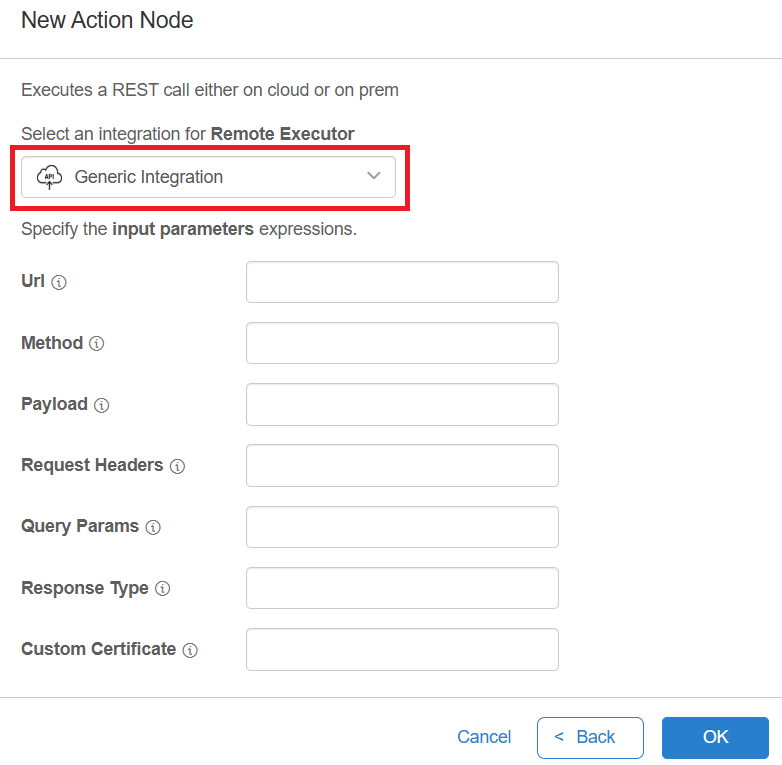
You can now create REST call action nodes in the Workflow studio that use an Okta integration for authorization credentials.\
\
**To create a rest call utilizing the Okta integration:**
1. Create an Okta Integration if you do not have an Okta integration.
2. Navigate to AI Automation > AI Workflow Studio and create a new Workflow or create a new one.
3. Select an Action node from the Node toolbar on the left of the studio.
4. Select Execute Rest Call from the list of available action nodes.
5. Select your Okta integration under the dropdown menu to use the Okta Integration.
## Issues Resolved in the Release
| Aisera ID | Product Area | Summary |
| ------------ | ---------------------- | --------------------------------------------------------------------------------------------- |
| 1.14.2026.1 | Analytics | Message for launching Content Change Identifier is wrong |
| 1.14.2026.2 | | Requests with a service catalog response are displaying as blank in Test Suite |
| 1.14.2026.3 | Conversational AI | AiError's are non-descriptive |
| 1.14.2026.4 | | Receiving broken URLs in bot responses |
| 1.14.2026.5 | Channels | URL is not showing as a link If there is a nested HTML element in the anchor tag |
| 1.14.2026.6 | Conversation | The Live agent name is not showing in the webchat |
| 1.14.2026.7 | | Response misrouting due to incorrect language detection on the universal bot |
| 1.14.2026.8 | | Language service error when text is empty |
| 1.14.2026.9 | | Attachments and paperclip icon not visible in webchat despite being enabled |
| 1.14.2026.10 | | Live agent chat is getting translated even though the language is not allowed |
| 1.14.2026.11 | Admin UI | Webex channel is unable to receive responses when Streaming Experience is enabled |
| 1.14.2026.12 | | String Input variable is incorrectly parsed as JSON in JS node while testing with test button |
| 1.14.2026.13 | Ingestion & Connectors | Poor handling of mapping errors for malformed Field Mappings |
| 1.14.2026.14 | | Users page should use tenant-level PII permissions instead of app-level permissions |
| 1.14.2026.15 | | ServiceNow Data Source with invalid credentials causes UI to stall |