> For the complete documentation index, see [llms.txt](https://docs.aisera.com/llms.txt). Markdown versions of documentation pages are available by appending `.md` to page URLs; this page is available as [Markdown](https://docs.aisera.com/product-release-notes/2025/bi-weekly-product-release-notes-sept-10-2025.md).
# Bi-Weekly Product Release Notes - Sept 10, 2025
Release Date: September 10, 2025
## Features
The following features have been added to the Aisera Gen AI Platform in this release.
### Applications/Bots
The following feature has been added to Applications/Bots in this release.
#### Universal Bot 2.0 works with a mix of 1.0 and 2.0 Child Bots
With the release of Conv 2.0, we also upgraded Universal bot so it can work correctly with 2.0 child bots. This functionality was released recently, however, some customers requested the new Universal bot 2.0 should be able to work with both 1.0 child bots and 2.0 child bots at the same time.
With this latest upgrade, we will support a mix of child bots so customers who are using a universal bot can choose to independently migrate each Conv 1.0 child bot app to Conv 2.0 app (and not wait for all child bots to complete migration before switching).
### Connectors
The following feature has been added to **Connectors** in this release.
#### Ability to Use Deprecated Jira Service Desk APIs
The Aisera Gen AI Platform now uses the SQL Enhanced Search capability with Jira data sources by default:
API that the Jira Service Desk connector uses by default:
[Search for issues using JQL enhanced search (GET)](https://developer.atlassian.com/cloud/jira/platform/rest/v3/api-group-issue-search/#api-rest-api-3-search-jql-get)
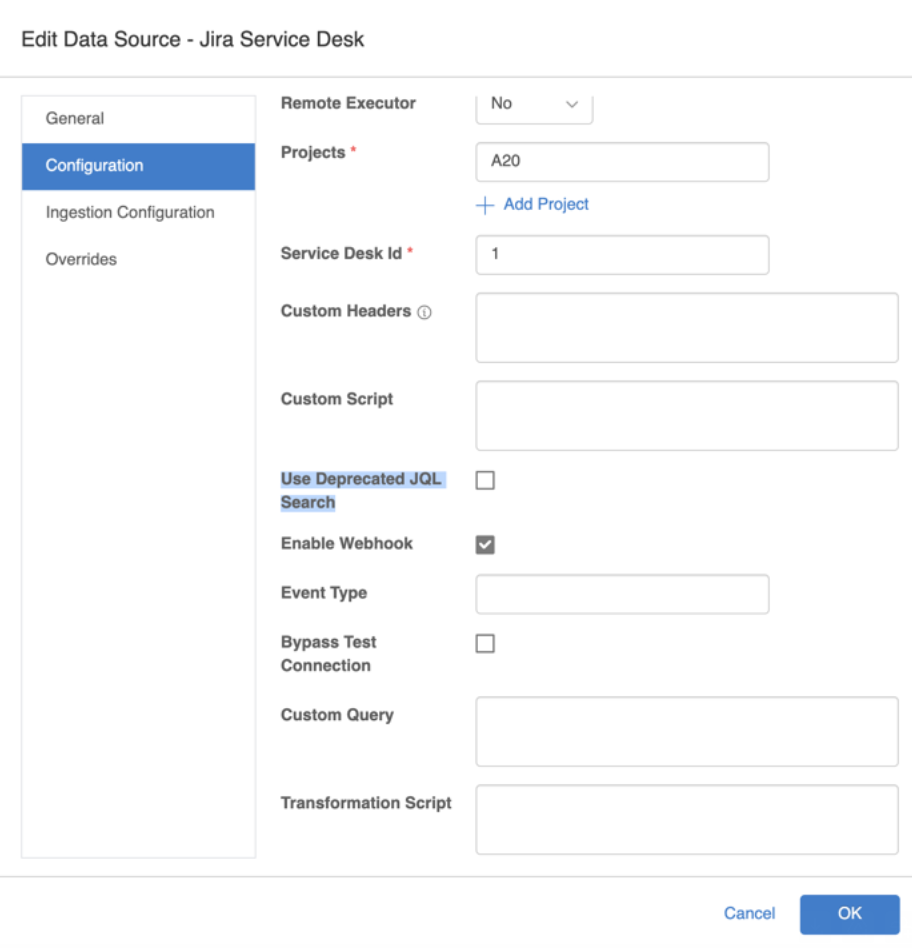
If you prefer to use the deprecated Jira JQL Search to retrieve **Ticket** data from a Jira data source, you can enable the **Use Deprecated JQL Search** option, which is disabled by default.
**To set the Deprecated JQL Search option:**
1. Navigate to **Settings > Data Sources**.
2. Open your existing Jira Data Source.
3. Choose the **pencil icon** on the **Data Source Details** page.
4. Select the **Configuration** tab.
5. Enable the checkbox with the **Use Deprecated JQL Search** label. This option is disabled by default.
6. Click the **OK** button.
Now the Aisera platform will use the deprecated API with the Jira Data Source:\
[Deprecated JQL](https://developer.atlassian.com/cloud/jira/platform/rest/v3/api-group-issue-search/#api-rest-api-3-search-get)
## Enhancements
The following feature has been added to the **Enhancement Type** in this release.
### Flow Search
The following feature has been added to the **Flow Search** in this release.
#### Improvements to Workflow and Hyperflow (Flow) Searches for Conversational AI 2.0
In Conversational AI 2.0, Workflows and Hyperflows are matched to user Requests by comparing the request with the description within a Workflow or Hyperflow that’s associated with the bot.
In some cases, the Aisera Gen AI platform may match both a Workflow and a Hyperflow to the user request. When this happens,, the platform prioritizes the Hyperflow and executes the Hyperflow. If there are more than two Hyperworkflows matching a user request, then the platform asks the user disambiguation questions to determine which Hyperflow to use.
### Applications/Bots
The following feature has been added to the **Applications/Bots** in this release.
#### Country Regions Recognized by Applications/Bots
With previous releases, if the user request included a region, the Aisera Gen AI platform tried to map this region to its respective countries. However, the search was retrieving information based on one country only (the first from the group of countries) which had as a result to respond to the user for only one country (in case of APAC - Australia) instead of the whole region.
With this release, the applications/bot can recognize regions in user requests, such as APAC, EMEA, or EU.
### Issues Resolved in the Release
| **Aisera ID** | **Product Area** | **Summary** |
| ------------- | ---------------------- | ------------------------------------------------------------------------------------------------------------------------------------ |
| 9.10.1 | Agent Assist | Audit report refactorization to accommodate new changes about feedback comments |
| 9.10.2 | | When positive feedback is provided, feedback comment is empty |
| 9.10.3 | | Rename NBA Job Schedule Buttons and change the view from buttons to dropdown |
| 9.10.4 | | Blurred loading screen is not disappearing even after content in the widget is available in the background |
| 9.10.5 | | Query scanning lots of rows |
| 9.10.6 | Analytics/Test Suite | Average Click-Through Rate is not Showing Value |
| 9.10.7 | | CSV Issue: Downloaded CSV data request count is mismatching with the data appearing on UI when applying Language filter with Exclude |
| 9.10.8 | | Aggregate Service: Last Process time needs to be set only on successful task |
| 9.10.9 | | Top Requests Clusters and Resolved Requests by Clusters charts are not loading and giving error |
| 9.10.10 | | Mismatched number of records in export all records to csv vs UI for workflow analytics |
| 9.10.11 | | Request Page CSV Export Blank When Email Filter Uses Include Criteria with "aisera" or "workday" |
| 9.10.12 | Channels | Random Tags in Copilot Notifications UX |
| 9.10.13 | Conversation | Confidence scores in language detection are globally assigned to a language code |
| 9.10.14 | | Form inputs not appearing when invoking Workflows using Hyperflows in MS Teams. |
| 9.10.15 | | Copilot SSO auth Sign in fails with internal server error |
| 9.10.16 | | Conv 2.0 recommendation to handle slot filling issue |
| 9.10.17 | | Expected images not coming in the RAG results (multiple clients) |
| 9.10.18 | Flows | Linux AI Feedback options using Hyperflows |
| 9.10.19 | Ingestion & Connectors | API key is missing on Event Trigger Data Sources |
| 9.10.20 | | Generic data source not ingesting KBs |
| 9.10.21 | | Admin UI: values of new fields include extra spaces |
| 9.10.22 | | Data Crawler issues - where Job Status is showing 2.6K documents whereas in SOR I can see only 1.7K documents. |
| 9.10.23 | | Admin UI KB Details page fetches wrong version of document |
| 9.10.24 | | Display error in Datasource, when ingestion fails due to Translation issue \[UI] |
| 9.10.25 | | SharePointRestExecutorProvider: refactor so that it handles the SharePoint Client Authorization Properly |
| 9.10.26 | KB Gen | Validated chunks do not match the solution information |
| 9.10.27 | Ontology | Entity class deletion is not available in ontology production mode |
| 9.10.28 | Universal Bot | Settings API not routing correctly for parent app |
| 9.10.29 | N/A | PublicKB engine not responding |