> For the complete documentation index, see [llms.txt](https://docs.aisera.com/llms.txt). Markdown versions of documentation pages are available by appending `.md` to page URLs; this page is available as [Markdown](https://docs.aisera.com/product-release-notes/2025/bi-weekly-product-release-notes-feb-26-2025.md).
# Bi-Weekly Product Release Notes - Feb 26, 2025
## Features
The following features have been added to the Aisera GenAI Platform in this release.
### Channels
The following features have been added to **Channels** in this release.
#### Copilot Supports Custom CSS
You can now customize your Copilot channel to add your own color tags and images with a custom css snippet in the Copilot **Details**.
To add custom css attributes:
1. Navigate to **Settings > AiseraGPT**
2. Choose an existing bot that uses the **Copilot** channel.
3. Select the **pencil icon** to edit the bot Details page.

4. Double-Click the Copilot channel in the **Details** window. This brings you to the **Details** window for the **Copilot** channel.

5. Click the **pencil icon** to edit the **Copilot Details**. This brings you to a set of three **Edit Channel - Copilot** windows.
6. Choose **Next** at the bottom of the first window.
7. In the second window, choose the **CSS Mode** button.

8. Toggle the CSS Enabled button to **ON**.
9. Add the css attributes for your custom color and image.
10. Click the **Next** button and then the **OK** button to exit the **Edit** windows.
### Knowledge Base Article Generation
The following features have been added to **KBA Generation** in this release.
#### New Feedback Ratings for Generated Articles
This release includes a new feedback mechanism for documents that you generate using the Aisera Gen AI platform.

Your bot users now have the option to provide feedback with the following choices:
* **Highly Accurate:** This option indicates complete satisfaction with the generated answer.
* **Moderately Accurate:** This option should be selected when the generated document is mostly correct, but has some issues. Sub-options are available to provide more specific details about the issue.
* **Inaccurate:** This option is for when the generated document is incorrect. There are also sub-options available to specify what went wrong.
The sub-options that are available to the users change based on the radio buttons that the users choose.

Your bot users have the option to edit and resubmit their feedback. They can also delete the feedback, which will reset the section, making it appear fresh with all radio options unselected. The user can then choose to add new feedback or ignore it.
#### Accuracy Feedback Search Filters
Additionally, we have introduced a new **Search** filter option for **KB Articles** called **KB Accuracy Feedback**. This allows you to filter and view generated documents based on the feedback your bot users have provided.
The **KB Accuracy Feedback** field has also been added to the tabular section of the **Knowledge Generation** page, so you can see the corresponding feedback for each document.

To view these feedback fields in the list view on the **Knowledge Generation** page, navigate to **Add/Remove Columns** (represented by **three dots**) and add the field.

## Enhancements
The following enhancements have been added to the Aisera GenAI Platform in this release.
### Data Integration
The following enhancements have been added to **Data Integration** in this release.
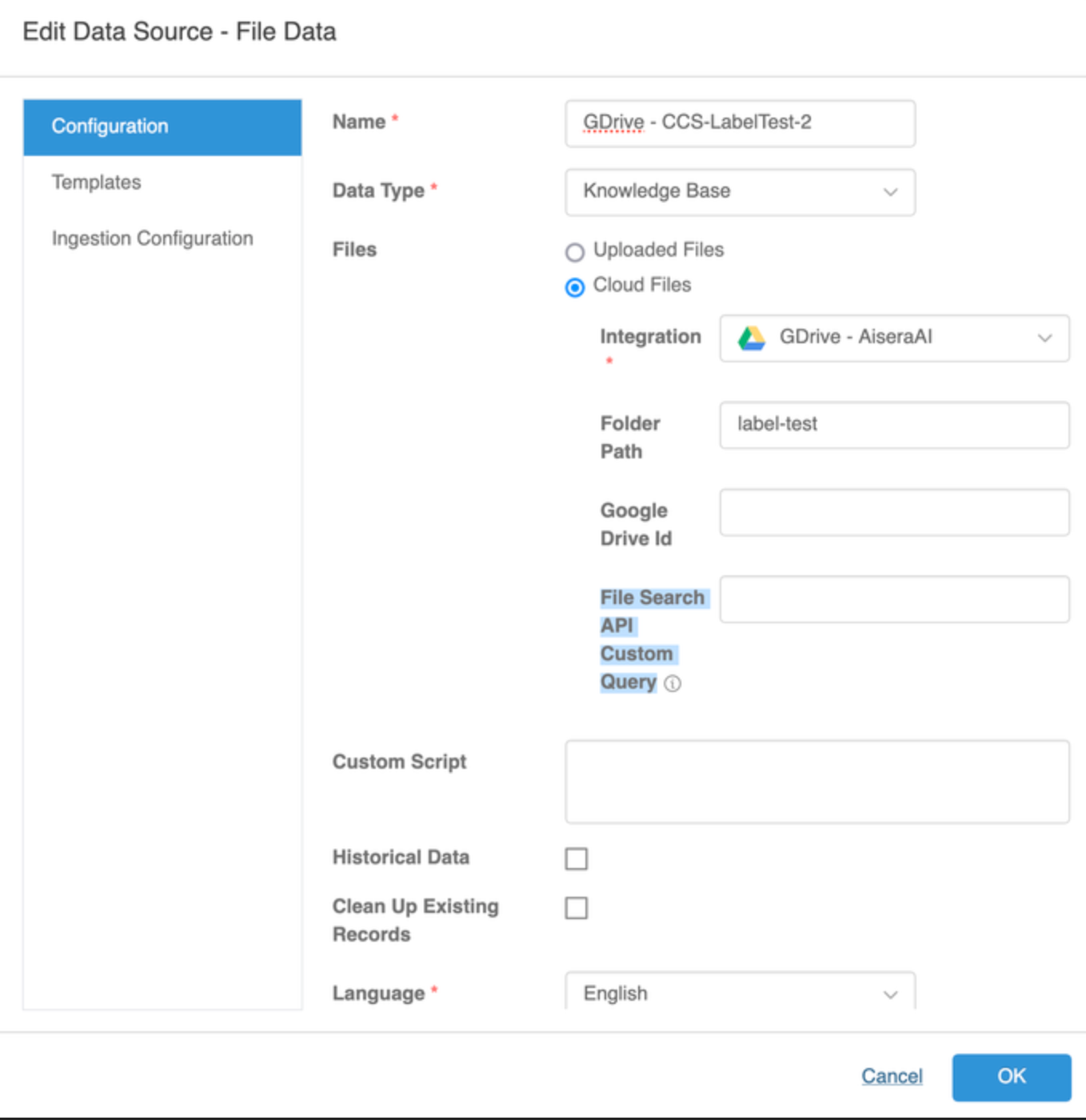
#### Google Drive Supports Custom API Queries
In the Data Source Configuration for a Google Drive integration, there was previously a parameter called, **Labels To Filter** that was used to limit KB Article ingestion based on labels.

\
This field accepted a comma-separated list of label IDs to flag articles that are meant to be excluded; documents that contain them will not be ingested.
This field is now called **File Search API Custom Query** and in addition to label IDs, it now also accepts a [**Google Drive Rest API**](https://developers.google.com/drive/api/reference/rest/v3/files) compatible query.
File Search API
This enhancement allows you to perform a more flexible filtering; this query can exclude labels like the old functionality, or include labels (make sure that ingested documents must contain some specific labels), filter on other metadata like the Document’s **Author** field.
### Agent Assist
The following enhancements have been added to **Agent Assist** in this release.
#### Tab Order Changed on Agent Assist Window
The Agent Assist tab now displays to the left of the Auto Resolution tab on the **Agent Assist** window.