> For the complete documentation index, see [llms.txt](https://docs.aisera.com/llms.txt). Markdown versions of documentation pages are available by appending `.md` to page URLs; this page is available as [Markdown](https://docs.aisera.com/aisera-platform/adding-data-to-your-tenant/data-ingestion/field-maps/derivation-rules.md).
# Derivation Rules
## Deriving Data
Derivation rules provide the ability to transform inbound data or existing data from Data Sources to create new sets of data.
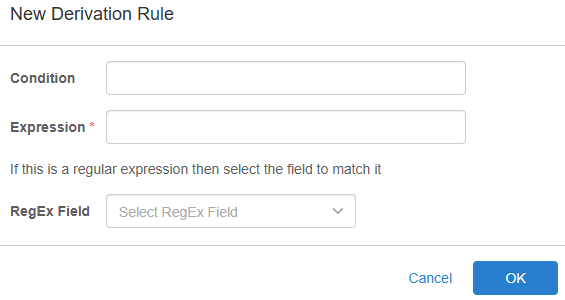
### Condition
The **Condition** field is an *optional field* used to determine if a rule will execute. The condition is inserted as a [JEXL expression](https://commons.apache.org/proper/commons-jexl/) wrapped in `${}`. If the value returned by the expression is true, the rule will execute. If the value returns false *or null* the rule will be skipped.
The following is an example of a valid condition for a Derivation Rule:
```java
${Source != null && Source=='servicenow' && priority != null && priority=='high'}
```
### Expression
This required field accepts a JEXL template string used to derive the value of the field. The following is an example of a valid expression which will concatenate the values of the three inputs with underscores:
```java
${Host}_${Source}_${check}
```
If [RegEx Field](#regex-field) is defined, this field will instead be treated as a Regular Expression and will be applied to the value of the field selected in the RegEx Field. For example, if RegEx was defined as hostname, the following expression would extract the first word from the hostname.
```regexp
([a-zA-Z]*)-[0-9]*\..*\..*\.[a-zA-Z]* (?# billing-1.db.nydc.acme.com => billing)
```
### RegEx Field
This field contains a searchable dropdown list populated with all the field names already mapped for this data source. If a field is selected the [Expression](#expression) field will be treated as a Regular Expression (RegEx), rather than a JEXL template string. The input for the RegEx expression is the selected field.